
Evidence verification
After Recall has keywords and matching snippet cards, Flowing automatically checks qualifying draft paragraphs against the retrieved library evidence. A left-gutter mark opens red / green / yellow cards—an auditor, not a rewriter.
Evidence verification is the step after Recall: once recommended search has highlighted keywords and matching library snippets, Flowing checks qualifying draft paragraphs against that retrieved evidence set. It does not search the open web, and it does not rewrite the paragraph.
When paragraphs are checked
Wait for Recall snippets
Open the Recommended tab and keep writing until keywords appear with matching snippet cards. Verification starts only after both are present.
Write a qualifying paragraph
The paragraph must contain a highlighted keyword that has snippet cards. Short or mostly-formula blocks are skipped. In rich text, a longer prose paragraph qualifies; in LaTeX, a blank-line block of at least three non-empty lines of prose qualifies.
Leave the paragraph
While the caret stays inside a paragraph you are still editing, Flowing holds that paragraph—it will not verify it or change its mark. Move the caret out (or wait until the paragraph no longer qualifies) to let the check run.
The left-gutter mark
A colored bar and count appear in the left margin of a checked paragraph. The bar is segmented by card kind (red / yellow / green). A spinner means the check is still running. A slate mark with 0 still opens the dialog, so you can see the empty state.
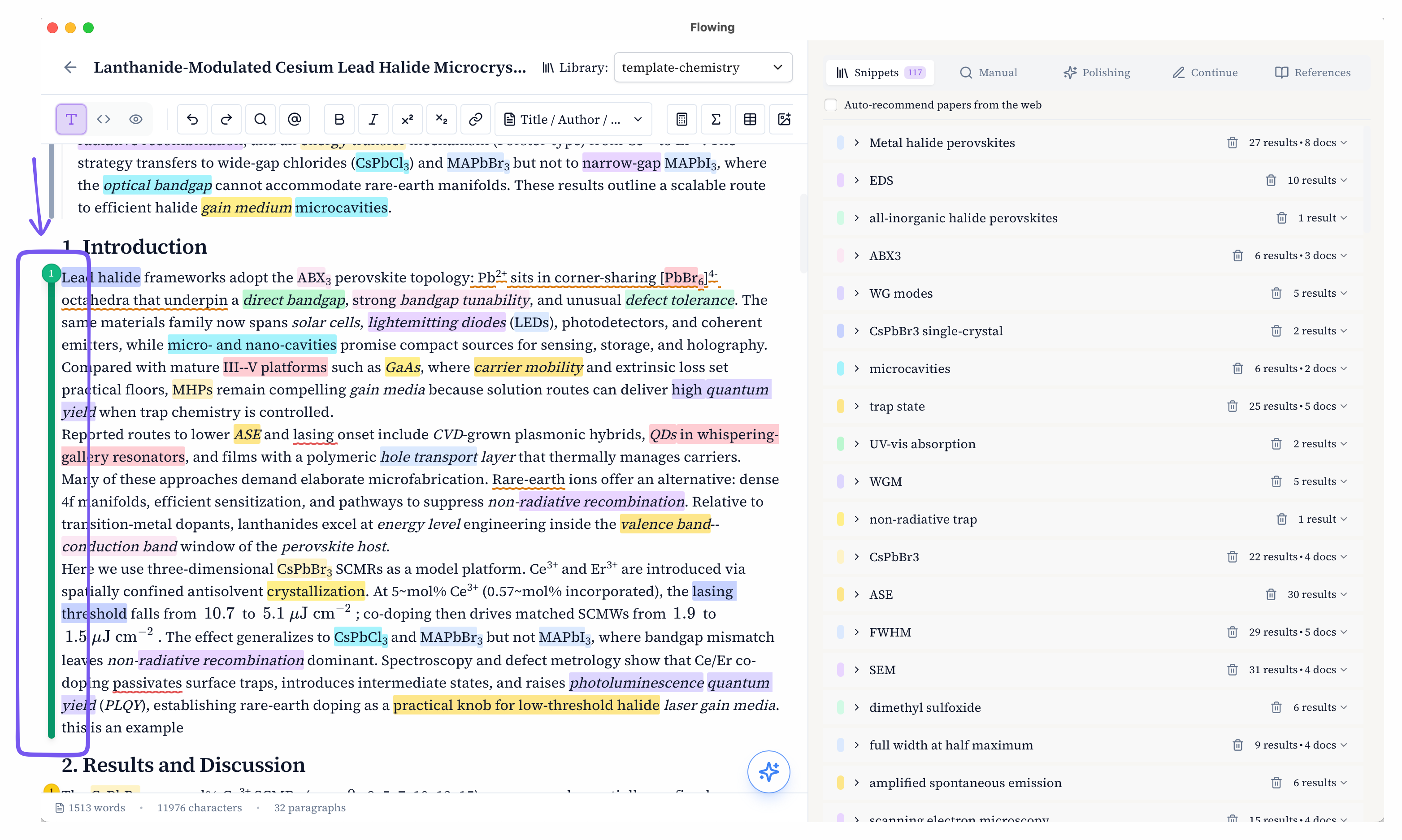
Open the evidence dialog
Click the mark to open “Check paragraph against library evidence”. The left pane is the paragraph (keyword highlights plus claim underlines). The right pane is the cards, with the same library evidence chips as polish—click a chip to jump to the PDF. The footer may show a short paragraph summary derived only from the cards that were emitted.
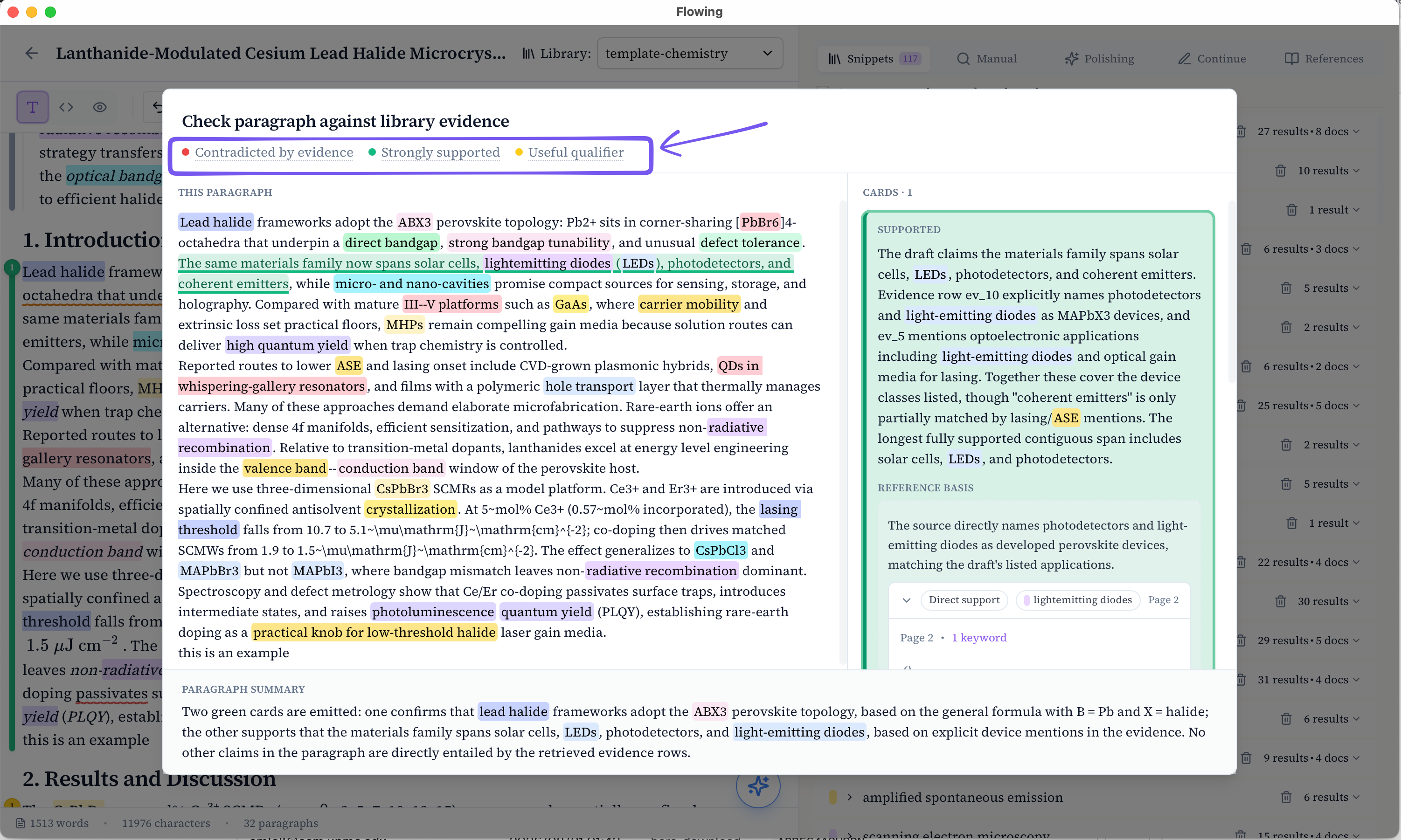
Red, green, and yellow cards
Cards are verdicts about a claim versus the retrieved evidence set (one or two complementary passages)—not a relevance score, and not “the paper is on the same topic.” A card may rest on one or two passages; if combining two fails, a valid single-passage card is kept.
Red — contradicted by evidence: the claim conflicts with the retrieved evidence in polarity, number, mechanism, or scope. The quoted claim must map onto the paragraph.
Green — strongly supported: the source directly entails the same claim, polarity, and scope. Paraphrase or a quantitative result is enough; extra scientific inference is not. The underline is the most complete contiguous claim that is fully entailed—not a keyword, not a stitched list, and not widened for readability.
Yellow — useful qualifier / extension: the evidence supplies a condition, limitation, comparison, mechanism, boundary, or scope that is relevant and not already in the paragraph. Yellow is not “the evidence does not support this claim.” Absence of support is not a card.
What it does not do
Verification only checks snippets already recalled from the libraries you selected—not the open web, and not papers that were never imported. It does not insert or change manuscript text. Unselecting a library drops that library’s cards immediately without a new request; reselecting restores the cached result. Switching documents loads that document’s cache, so re-entering the same draft with unchanged paragraph text does not re-verify.